- Author: Urooj Mehar
Date: Sep 16, 2025 - Category : Animation Studios




Almost everyone fears that Artificial Intelligence will replace us by taking away our jobs and leaving us with nothing. But, be for real now, at some point, we all wish to have a shortcut to ease our workload and perform on our behalf.
Let’s take an example of image editing. You have been working since morning, and it’s hitting 6 in the evening now, sitting with your half-finished design, a few blurry pictures, and a task up your sleeve where you have to combine 2 entirely different scenarios into one.
And deadline? It’s in 2 hours. Smells like a potential burnout.
But hey, stop stressing about your unfinished tasks and deadlines anymore because Google has introduced a new AI model to help you with all your editing problems swiftly.
Meet Nano Banana. Okay, we know it sounds more like an ice cream flavor, but ever since creators have gotten their hands on it, they are going nuts over it. The title can be funky, but behind all the colors and fun, it acts as a professional image editing model. Might be a little small in size, but the power it holds says something else.
Google Nano Banana is more than just another editing AI tool; it’s a unique way to show that creating an image does not have to be painfully slow or overwhelming.
Despite its playful name, Nano banana is Google’s latest AI model, launched specially for editing images. It turns your rough ideas or tricky edits into polished graphics in just seconds. Lightweight yet powerful, it is designed to work effortlessly with simple instructions.
With that being said, it handles all the heavy lifting regardless of the complexity of the work. Cleaning up details? Done. Merging elements? No problem. Generate new variations? It’s also done and dusted.
And here’s the key: Nano Banana is a part of the Gemini AI 2.5 flash image editing family, which means it benefits from the same technologies that power all the other Gemini tools.
The main difference? This one is just made to handle the visuals with speed and creativity. So, while the name might make you smile a little, the results will leave you too stunned to speak for sure.
At first sight, nano banana can sound like an image editing AI model just like the others; however, the way it handles your ideas is where things take a really unbelievable turn. It clearly listens and understands what you mean.
Unlike other models, which only paste different elements together and give you a “here, take this” type of work, the nano banana AI model really focuses on the context and applies changes naturally.
It is no wonder that the launch took everyone by surprise: it is reported that the Gemini app gained over 10 million new users and created more than 200 million image edits in just a few weeks.
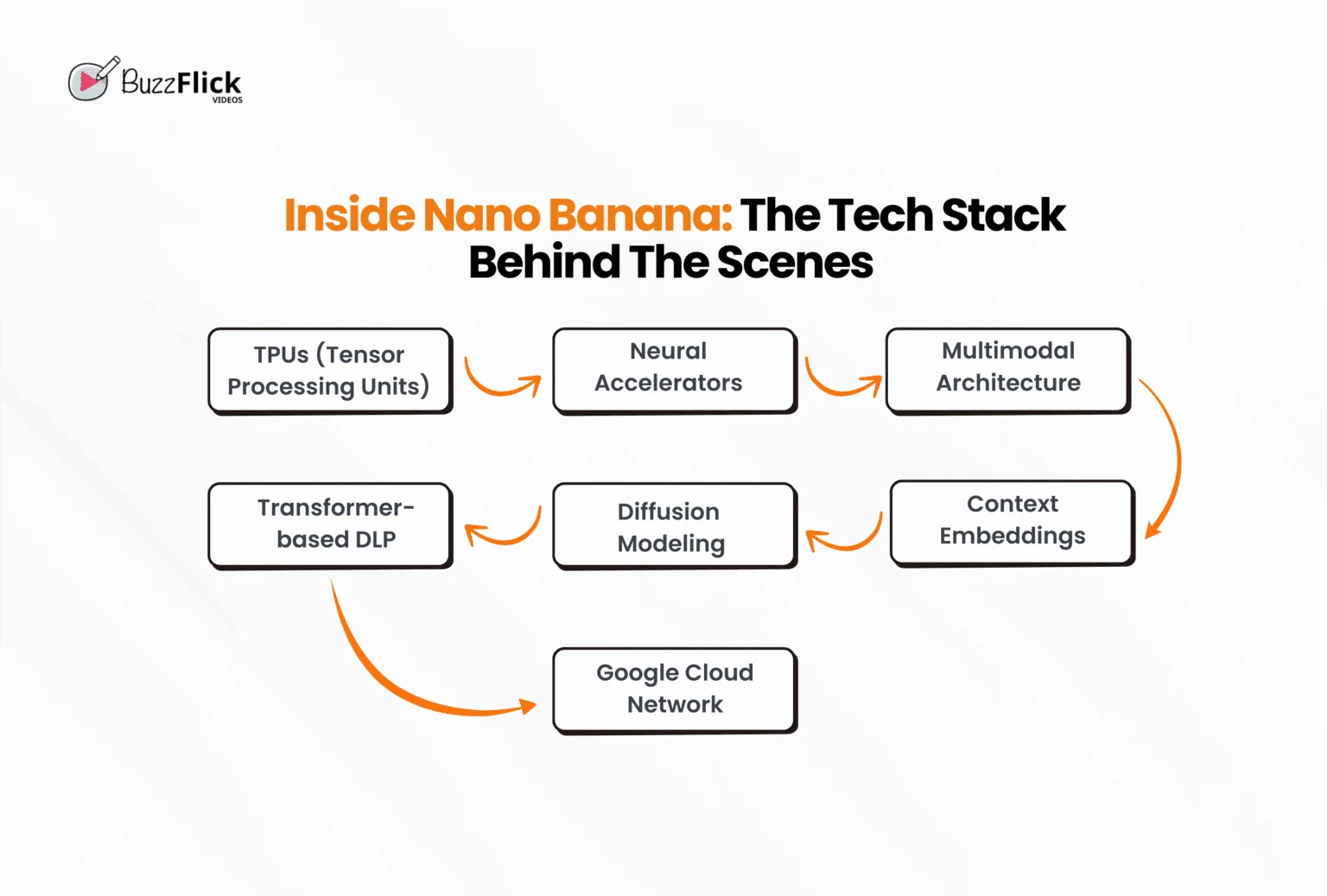
It is built on Tensor Processing Units (TPUs), neural accelerators, and the multimodal architecture, making it able to handle different types of data. The system mixes transformer-based deep learning, diffusion modeling, and context-aware embeddings, all at once, running on Google’s powerful cloud network.
This is the reason why nano banana image editing feels so fast, even when the majority of people are using it at the same time.
Gemini defines its role in Google’s AI system rather than just appearing to support Google nano banana. This is what it brings to the table:
Remember when editing with older Gemini models felt inconsistent and slow? This is the place where Google nano banana AI shines the most. It has improved on prior weaknesses by processing and delivering faster, cleaner, and more reliable outputs.
Think of the times when older Gemini tools might have changed faces while editing the image. Well, safe to say that it does not happen anymore. Still a part of the Gemini family, but feels more like a next-generation step rather than just a latest upgrade.
Any change begins with frustrations, and for creators out there, that frustration was a result of waiting, waiting on edits, consistency, and pictures to reflect their imaginations. This is where Google Nano Banana changed the entire game by moving to provide faster and natural editing.
Many experienced blurred textures and slow prompts follow with the GT-4.5 model; however, this new model promised something that users were really looking for. The numbers also reflect that Gemini gained 284.1 million visits in just a month, proving that people are using a reliable AI image-generating model at scale.
The factor that sets it apart is how quickly it gets the job done. With nano banana image editing, edits no longer take minutes; they are just done in seconds. No matter if you want to clean up the details, adjust colors, or merge two entirely opposite elements, the model handles it almost right then and there.
You no longer need to wait for minutes and still put in another prompt to get the desired results. Nano banana gives you a polished outcome on the first attempt in a single prompt, much like 3D animation, where complex visuals are smoothly created with dedication and precision. And just like a professional 3D animation company, Nano banana ensures that every detail is crafted with accuracy, speed, and creativity.
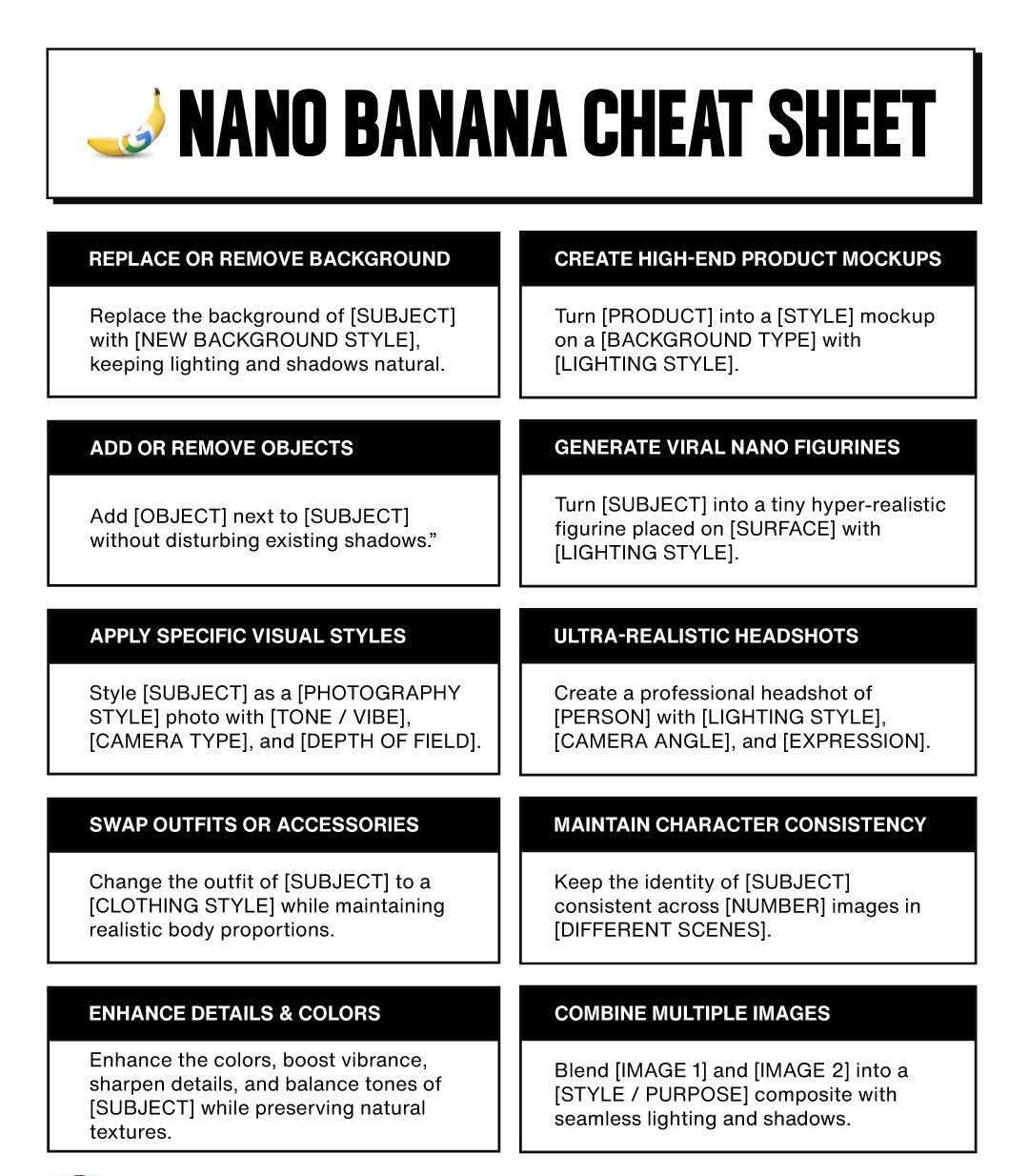
The prompts are the main aspect of customization. Google Nano banana AI understands all the instructions clearly, so instead of typing a basic and generic command, you can add more details, mood, or style direction, and still get a clean result. This means that you can experiment with different nano banana prompts without messing up the core image.
Want to add something else to the background, brighten up the tone, or create a surreal vibe? Just tell it and watch it listen and adjust the changes accordingly.
It is built directly into the Gemini app within the 2.5 flash image editor. The application serves as a central Hub to access the model, letting you go stress-free from juggling between extra plugins or third-party software. Your edited images are automatically stored in the cloud, and the best part is that you can access them from any device at any time you want.
This update rolled out in the background to let you work with the latest version without even lifting a finger. This integration is how Google Nano Banana keeps your workflow fluid, which makes working on edits less like switching between models and tools and more like creating one connected space.
We cannot ignore the concerns about safety since a lot of editors and businesses are leveraging Nani Banana AI’s free access ever since it has been doing wonders. Google created this model by keeping privacy and reliability as its first priority. Every edit that you make passes through secure processing layers, minimizing the risk of leaking any personal data.
On top of everything, it includes other safety features like content filters and watermarking to protect the intellectual property. Now, you can reliably use it for working on personal projects or handling client work with a strong and secure blackened.
There are other AI models that promise to provide you with the same or you can say somewhat similar results, but let’s be real, it’s hard to keep notes and remember what every model does differently from the other.
Here’s a quick table for you to easily compare how Google Nano Banana AI is different from other AI Models like DALL-E and MidJourney.
| Model | Core Focus | Accessibility | Strengths | Weaknesses | Best Use Case |
| Google Nano Banana | Mobile-optimized AI model | Runs directly on-device | Fast, energy-efficient, optimized for constrained devices | Limited compared to heavier models | Edge AI, mobile apps, real-time inference |
| Stable Diffusion | Open-source text-to-image + editing | Downloadable, runs locally with GPU; also via web apps | Highly customizable, thousands of fine-tunes, strong editing (inpainting/outpainting) | Hardware-intensive, variable quality depending on model | Research, hobby projects, and fully custom AI art pipelines |
| DALL·E (OpenAI) | Text-to-image generation | Cloud-based, integrated with ChatGPT & API | Natural prompt understanding, built-in safety filters | Limited customization, dependent on OpenAI servers | Quick, safe, accessible AI art |
| MidJourney | Artistic & stylized text-to-image | Cloud-based via Discord bot, subscription required | High-quality, artistic, imaginative outputs | Limited transparency, no local use, subscription paywall | Concept art, design, marketing visuals |
| Adobe Firefly | Generative + editing (with licensed data) | Cloud service integrated into Adobe Creative Cloud apps | Safe for commercial use, text effects, tight integration with Photoshop/Illustrator | Requires an Adobe subscription, less flexible than open-source | Creative professionals, marketing, and design teams |
| Ideogram | Text-to-image with text rendering | Freemium, cloud-based | Best at generating readable text inside images (posters, signs) | Narrower scope, less versatility than SD or MJ | Ads, posters, social content with text |
After the hype of Google Nano banana, people who are enthusiastic about learning and using new tech are looking for ways to use it. The new AI model may sound powerful and somewhat fancy, but let us burst your bubble that it is as simple to use as its name. No endless sliders and no confusing panels.
In Fact, AI image editing tools and models have decreased the workload by 45%, proving that AI is conveniently shifting the creative world.
So, you’re trying image editing for the first time or looking to get a hold on your nano banana prompts. This step-by-step guide will tell you the fun way to turn your burnout into colorful and creative edits.
Hold on first! Before jumping into editing images, first take a moment to set the stage. Okay, we know that preparation may sound so boring, but to be fair, it saves you from getting lost in the chaos.
Choose the photo (or photos, totally depends on you) that you want to edit, and decide what you need, for example, a portrait, landscape, or square format. Tidy up the names of the file, so that if you are combining different images, make sure they are clear and not too pixelated.
This sets a better foundation to work with the Google nano banana AI model. You can think of it like creating a 2D animation. The final results will turn out messy without a proper storyboard.
You have laid the foundation; it’s time to get inside the Gemini app. Once you open it, you’ll be face-to-face with a clean interface with an upload button waiting for you. You can either drag and drop your selected picture or tap to browse your device. The real beauty of it lies in letting you select an image of any format.
However, if you aim to combine multiple photos, make sure to upload more than 2 images; the system is built to handle everything without any lag. Within a few seconds, your project loads, and you are all set to edit.
Unlike other editors that make you navigate countless menus to the point where you lose your cool, editing with nano banana image gets you straight into the action. Upload, blink, and voila! You are already in a futuristic workspace powered by Gemini 2.5 Flash technology.
This is the part where real fun begins, the nano banana prompts. Here, you don’t need to square up with brushes, different layers, and endless sliders. All you have to do is just type what you really want.
Say it like this: you want to replace the sun with Cumulus clouds? Explain it to the AI. Want to add a new tag to the product? Just say it and wait for the magic. The Gemini’s AI engine reads these simple words and turns them into professional edits that, at one point, you might think it’s either done via Photoshop or maybe through some abracadabra.
But trust us, that’s just your creativity that guided the model.
You can relate to it more by creating a whiteboard animation. Focus on the clear script in order to get better visuals. Aiming for sharper results? Try to make your prompts smarter and maybe add a bit more depth than “add cumulus clouds.”
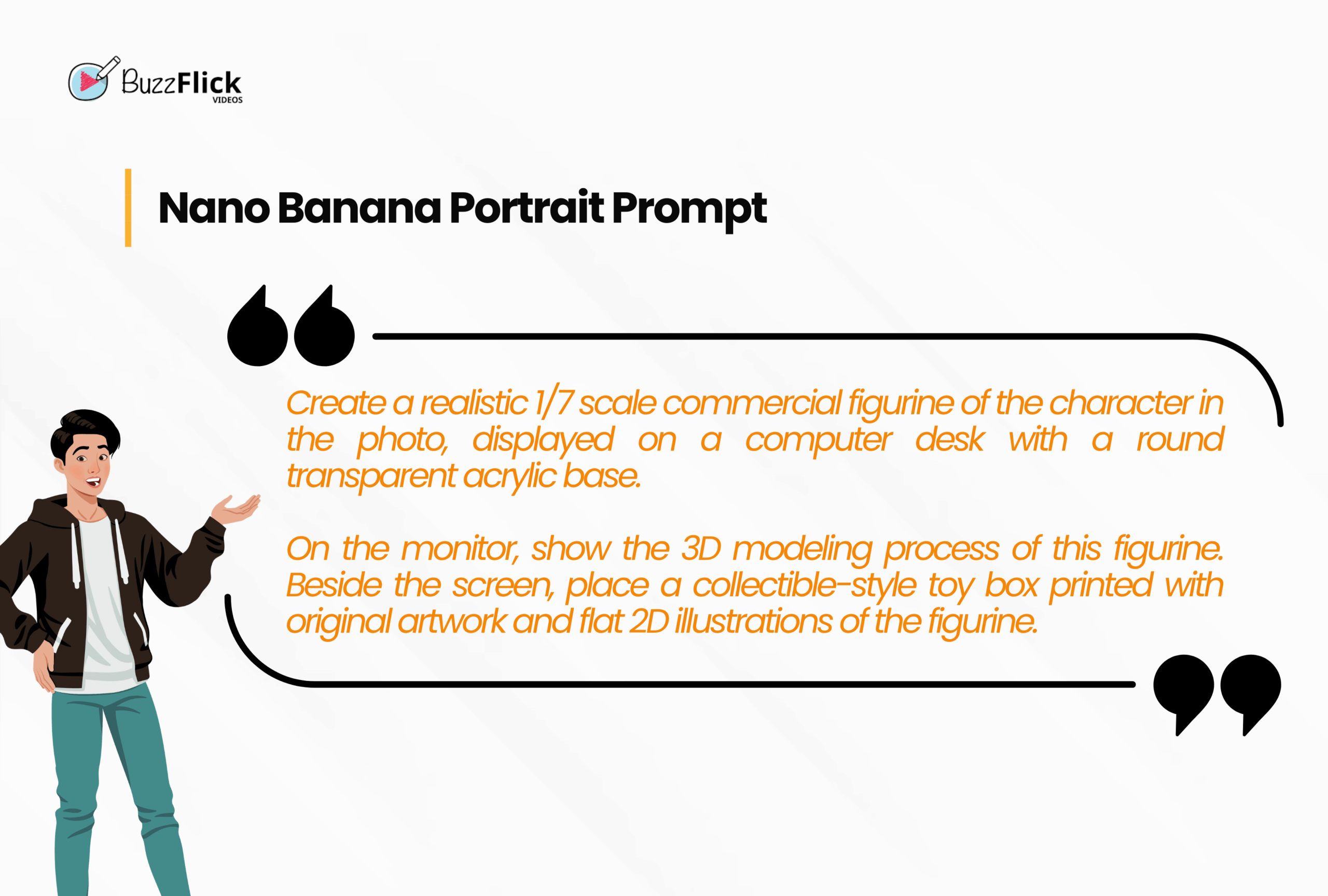
Done with writing the prompt about adding cumulus clouds into your picture? Now, click generate image and watch the real magic unfold right in front of your eyes. You must be thinking, “How long is it going to take?” and to be honest, it’s genuine to think since other AI models leave you staring at a loading screen, but with nano banana AI, you can expect the results instantly in the blink of an eye.
But here is the bonus part: if you don’t like your first result much, just refine it at the exact moment. Feels like the image is darker? No problem, add a prompt like “make it brighter” and watch it make your image glow without breaking the flow.
As it runs on Gemini 2.5 Flash image editing, the edits remain sharp, colors are always balanced, objects don’t even glitch, and the main thing is that the characters in the image don’t shapeshift at all.
It’s time to export your work to your device. Gemini lets you download pictures in different formats and resolutions, tremendous for social media, presentations, and even for high-quality prints.
No fuzziness, and of course, no last-minute crashes. And here’s the cool: it secretly marks your images with a hidden signature known as SynthID watermarking to keep your work safe.
Moreover, your edits are synced across devices. Just in case you began working on a laptop and felt lazy, you can continue working on your phone while lying comfortably in your bed
With the new Google model, the process of editing, creating, or mixing images ends as smoothly as it started.
If you make it to this end of the guide, we assume that by now, you must know each and everything that you need to know about Nano Banana AI tools and features.
But, to make things easier for you, here is our last effort.
As we have seen how Google Nano Banana AI turns image editing fast and nearly magical, but why should images have all the fun? What if we tell you the same energy can change your animated videos as well?
At BuzzFlick, we are taking the playful punch of nano banana and putting it right into your videos, giving your visuals a double shot of creativity.
No more slow rendering and dull edits. This means that you do not need to wait for at least a week to see the results. Just present your idea in a rough draft and watch it go from concept to final frames instantly, while still carrying the handmade storytelling that BuzzFlick is known for. With Nano banana working side by side, your animated stories will speak to your audience and buzz with creativity.
Yes, Google offers basic access to the AI model via the Gemini app or AI Studio, but free usage is limited by daily quotas.
Yes, Gemini 2.5 Flash Image allows fusing multiple images, so that you can add several photos for reference and let the model combine them all into one cohesive output.
The fixed number has not been revealed yet; however, daily image quotas depend on your account tier and the current policy of Google, such as free, pro, and ultra.
It is Google/DeepMind’s watermarking system that adds invisible and machine-detectable marks into AI-generated images so the results can be easily identified as AI-created. It is designed to improve transparency and provide proof of who created the image without altering the picture.
Chromebooks have grown from just for typing essays and watching skits to letting everyone test their creativity in their desired ways. Yes, those days are...
Read More
Get A Custom Quote Now


Copyright © Buzzflick 2025, All Rights Reserved.
Get Video Animation at Reasonable Prices at BuzzFlick! Get A Quote!