- Author: Umair Malik
Date: May 23, 2023 - Category : Video Marketing



Are you thinking to create a YouTube channel? If yes, then let us inform you that it is the best decision you will be going to make to increase your business potential and brand awareness online. YouTube is the most visited social platform after Facebook and its content is totally video based.
According to Statista, YouTube’s content was accessed by over 2.56 billion users worldwide by November 2022. Not only this, global YouTube usage is likely to be increased by 263 million users in 2023.
Keeping in mind the significance of YouTube videos, we are here with a detailed guide on how to post a YouTube video. This article will cover all the details you need on how to make a YouTube post using a desktop or mobile. In addition, we will share some useful YouTube video publishing tips to help you grow your channel.
Posting on YouTube is quick and easy and there is no rocket science involved. YouTube’s UI is really intuitive and you will only require a few clicks to complete the video uploading process. We will discuss how to make a post on YouTube using a desktop and how to post a YouTube video using Android or iPhone in the steps below.
Before you learn how to post a YouTube video, let us inform you about the video formats YouTube supports. YouTube is fairly intuitive and YouTube supports a wide variety of video upload formats making it easy for you to run your YouTube channel. These formats are listed below:
Most video productions take place on desktops, so marketers often use desktops to upload YouTube videos. Here are some simple steps to follow to upload a YouTube video on the desktop if you are wondering how to post a YouTube video:
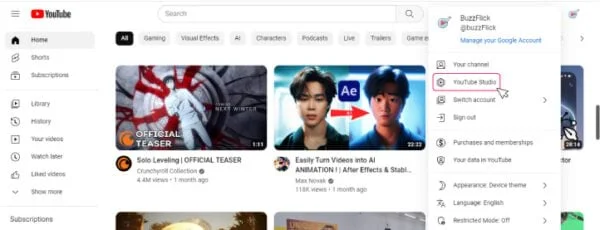
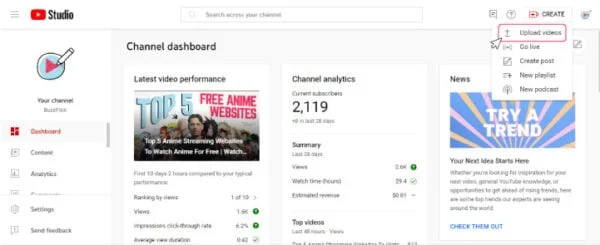
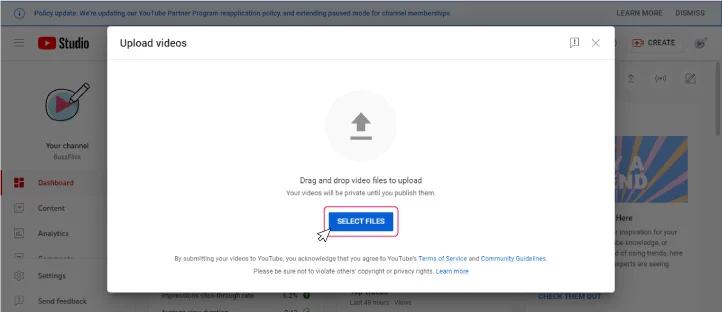
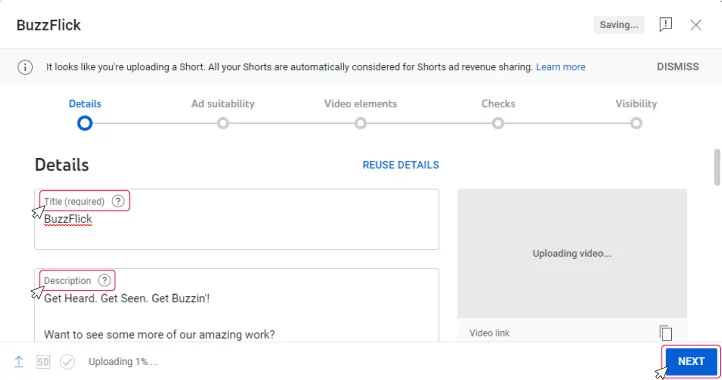
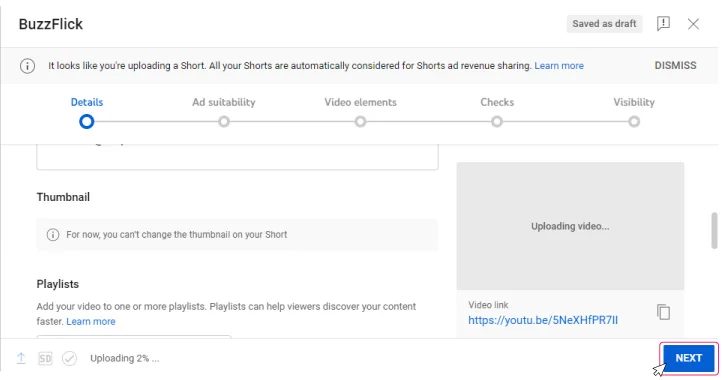
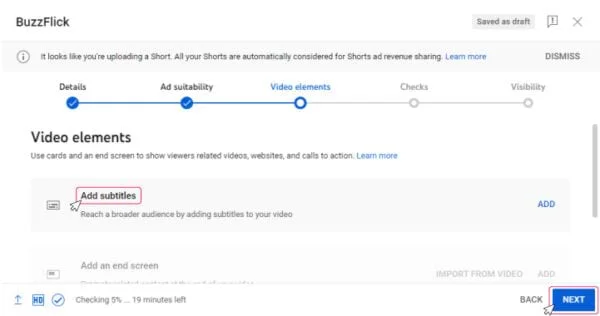
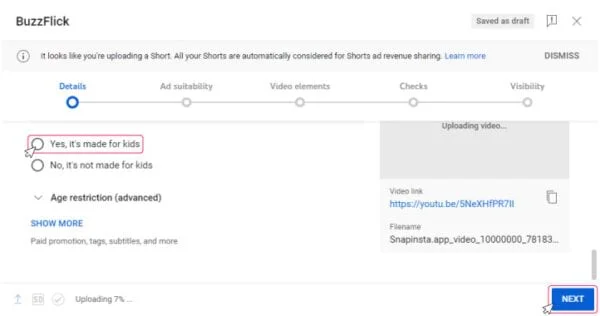
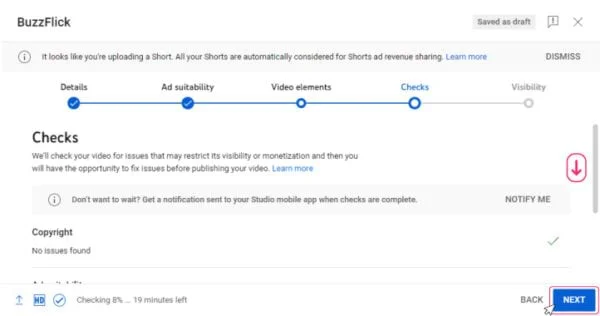
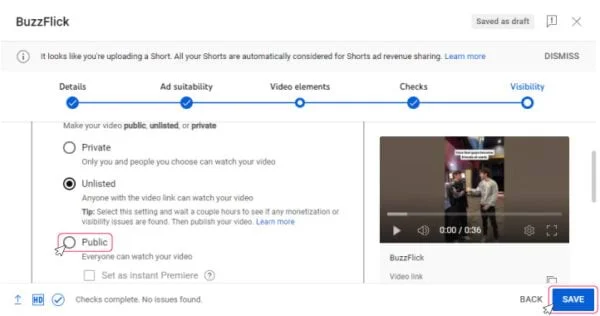
That’s how you post a video on YouTube video using your desktop in easy steps. But if you do not have time and want to outsource your YouTube channel management, BuzzFlick is here to help you out. Get in touch with us to get your problem sorted.
Get In Touch For YouTube Video Production Services
YouTube facilitates its users in every way possible and you can upload your content or YouTube video on mobile while you are on the go as well. The YouTube publishing process is even easier on smartphones. Here is a step-by-step explanation of how to post a YouTube video using a smartphone.
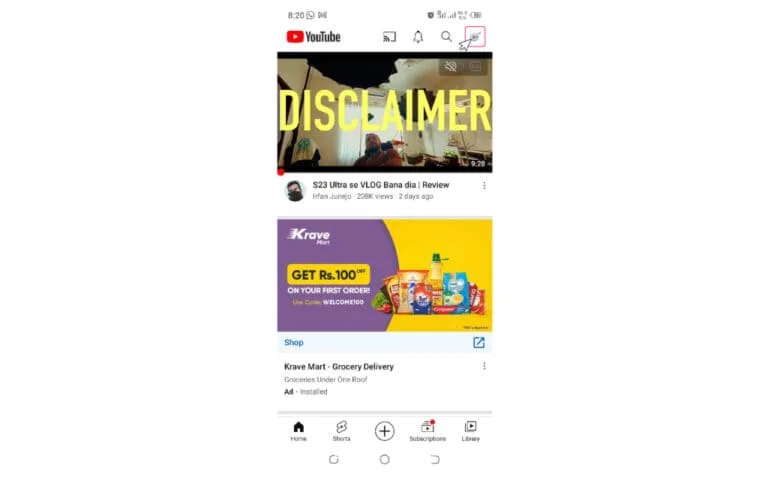
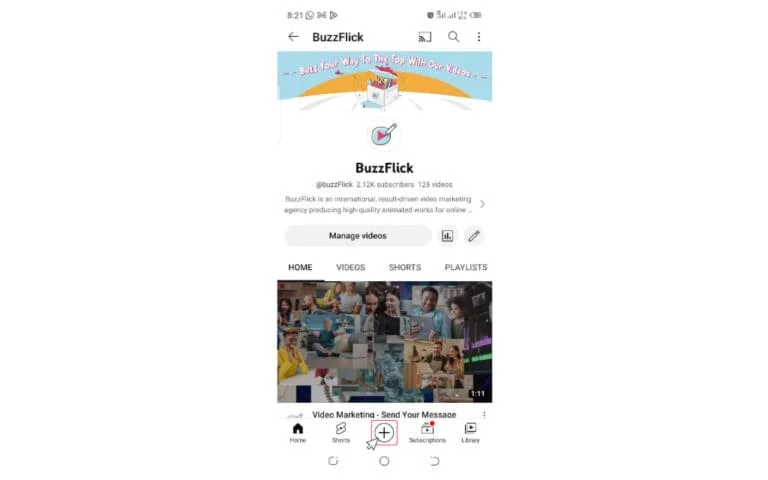
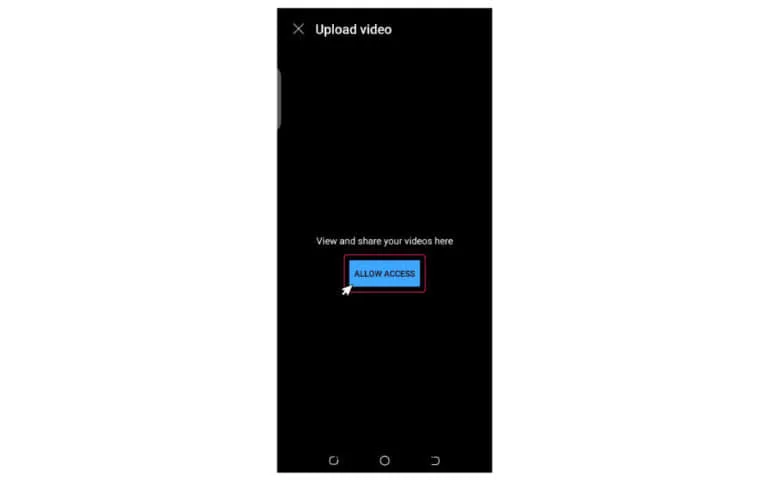
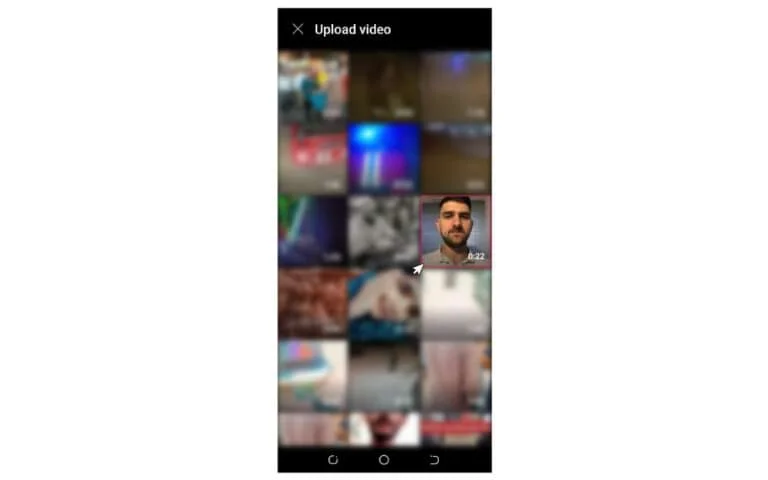
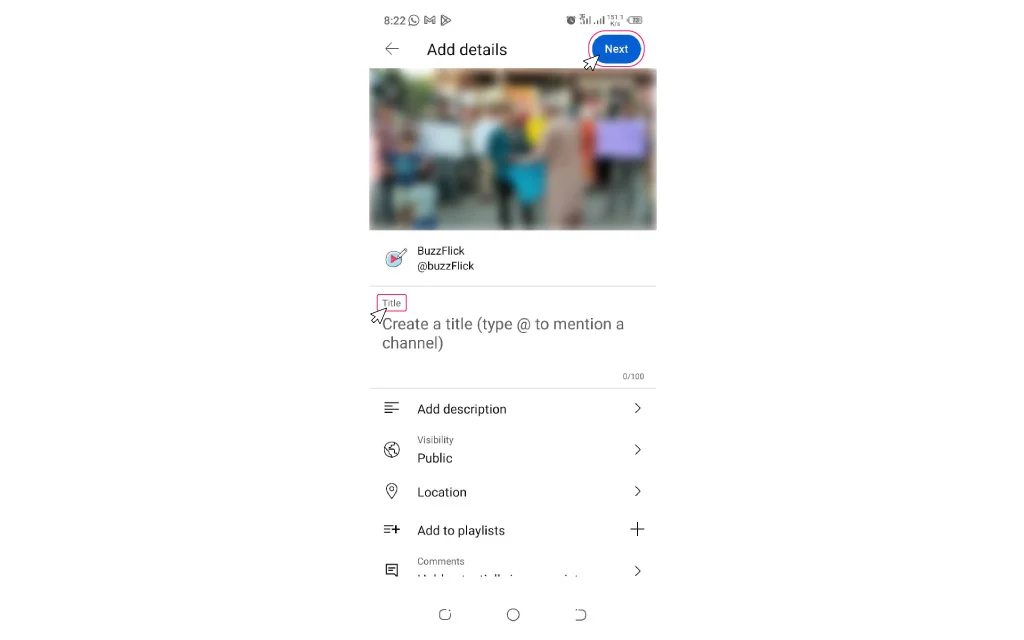
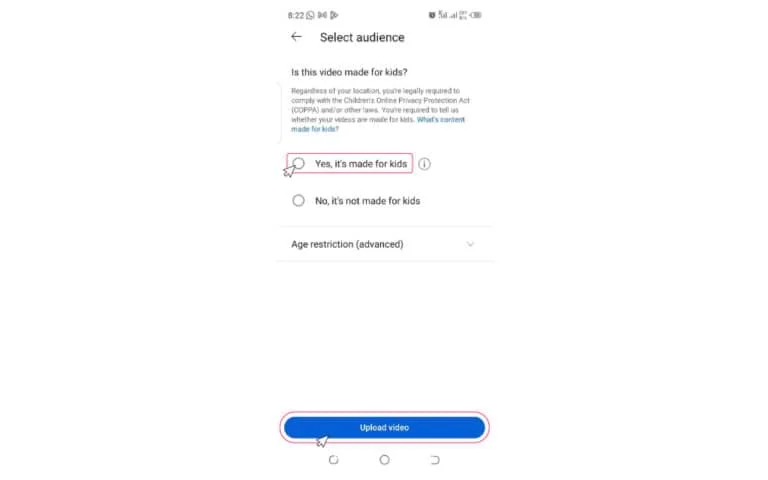
Note: You can set a specific time and date to publish your video. Just tap the “Schedule” option on the same “Set Visibility” screen and schedule your video posting at your desired time and date.
That is how you can use your mobile to publish the YouTube video. It’s simple and easy and you can do it while you are on the go. YouTube channel management is easy with BuzzFlick. Get in touch with us to get your channel sorted.
We have curated the very comprehensive, self explanatory video guide for you here if you are uploading your YouTube video for the first time and skeptical about how to post a YouTube video. Watch the video below:

You probably have learned how to post a YouTube video. Now we will focus on details you need to keep in mind while uploading YouTube videos. The following details should be considered while posting on YouTube and help users with the video details.
Use the following format for video attributions:
[Channel Name] [Video Title] [Video ID]
Add “Correction:” or “Corrections:” add the timestamp, and correction explanation. It will appear in your video while your viewer is watching your video as a “View Corrections” info card.
To format your text in video descriptions, use this:
Bold text *Example*
Italian Text _Example_
strikethrough text -Example-
The thumbnail is the image depicting video content before your viewer clicks on the video. It should be intriguing and has elements your video has.
The playlist is helpful for your user. You can add your video to a relevant playlist or if it is not there on your channel, you can create one. Creating YouTube Playlist is very easy and it solves your user’s problem of searching the relevant content.
YouTube complies with the Children’s Online Privacy Protection Act (COPPA). It helps YouTube to evaluate if your video is appropriate for children or not. You have to select your video visibility wisely.
You should always age-restrict your videos if there is content not appropriate for every age group.
Entering the location filming location of your video helps the local audience to discover your video.
To make your video extremely helpful for users, use automatic video chapters along with titles and timestamps.
Video tags help correct the viewer’s search mistakes. They are actually the descriptive keywords you can add to help your video discovery.
Always select a video category to help viewers easily find your videos. There is an example of the top animation channels on YouTube. You can go through it. Also, we are giving an example of how to make educational videos here: Please choose according to the following:
There are a lot of types of YouTube videos ranging from educational to informational. You can select your video type ranging from how-to, tips, activity, lecture, concept overview, real-life application, problem walkthrough, science experiment, or others.
Important information related to any problem, or questions, addressed in the video should be added with the timestamp.
Select the video level according to the content. Such as suitable for Grade 10 or even advanced level.
Search the YouTube database and add an exam, academic standard, or course that is related to your video.
Adding these details to your video is important because these details make your video easy to discover and more helpful for users. You can evaluate your video performance also through YouTube analytics metrics and see that YouTube is recommending these videos more frequently and it results in increasing your views and engagements to grow your YouTube channel rapidly.
Although now you know how to post a YouTube video, it is still not enough. Uploading on YouTube is one process and there is a lot more to it. That is why we are stating some great YouTube publishing tips to increase your video reach. These tips will help you growing your YouTube channel exponentially and increase your brand reach:
The content that provides some value, and some quality to viewers is definitely the most engaging. That is why this is a no-brainer. Your content should be high-quality, high-value, engaging, and represent your brand really well. Maybe you have great ideas for your videos, but that does not really mean that it is difficult to implement. A simple production with great quality and high value is enough.
Make sure you know what topic you are covering, and how well it is helpful for the audience you are producing for. This will require you to research well before producing content. Just do not post anything that comes your way or you will lose engagement.
If you are facing difficulty in producing high-quality content, for say, you are an animation company and wants to upload videos on your YouTube channel for educational, or informational purpose, you can outsource your video production to BuzzFlick. It is one of the best Animated Video Production Services that will help you a lot in quality video production for your YouTube channel.
Research your audience well before creating your YouTube content. Businesses that keep in mind their audience’s needs and wants, conduct proper market research, and come up with personas to prioritize their audiences on top of their mind are likely to get more engagements and followers on YouTube channels than others.
So, ideas for your YouTube videos should revolve around your audience first and see what they need and what they are finding to create personas and come up with content that resonated with them.

Before learning how to post a YouTube video, you should know that your videos will stand out on YouTube if they have eye-catching, compelling thumbnails. The thumbnails help you grab attention immediately.
Although there are auto-generated thumbnails available and you can fall for them, however, it is not recommended if you want massive traffic. Be creative with your thumbnails relevant to your brand. Video thumbnails are also a good option to use to let the audience go through your video preview to intrigue them.
Before publishing your YouTube video, make sure your video intro is compelling enough to hook the viewer from the beginning. There are a lot of YouTube intro maker tools available you can use to help you out in making a video with an engaging and interactive opening.
If you want to make your videos more inclusive and more intuitive, add closed captions or subtitles. Not only it will be helpful for your viewers to understand your video but it also helps in expanding your potential reach. Imagine your video is being watched by people with hearing issues. Will you not make any effort to explain your content?
Also, people with less understanding of English will not watch your video if there are no subtitles in it. Also, some people watch videos in locations where they cannot increase the device volume. So, it is highly recommended to add subtitles to your videos especially education-based videos to make people understand what you are talking about. It takes a few seconds to add them but it worths a lot.
Monotony is the silent killer for your channel. Add some spice to your channel through a variety of content. If you are consistent with your content niche, it’s good. But being consistent does not mean being monotonous.
The best way to break the ice while being relevant to the brand is to try different features. YouTube offers a lot when it comes to publishing video content and engaging audiences, including YouTube shorts, and Live streams. Experiment often and get to know what suits best to your audience and find the tempting recipe to grow your channel.
YouTube short is a booming trend and you can incorporate it to increase your audience engagement by learning how it works.

Do you know YouTube videos account for 70% of the top 100 Google search results? Believe it or not, any search query about a product or having “how to” factor in it on Google comes with the result of a YouTube video on top.
In fact, sometimes YouTube video results rank before any blog or website. After Google, YouTube is a powerful search engine and people search for their queries on YouTube just like Google. The difference is only the format.
That is why you should use YouTube to boost your marketing strategy. It is important to think of your YouTube videos as a basic content piece that requires them to be well-optimized with top keywords, relevant tags, and metadata. So, focus on YouTube video SEO by following these practices to increase your YouTube video rankings.
Including targeted keywords in video titles and descriptions is a good practice. It will help to rank your videos better and discoverable for users.
If you say your targeted keywords in your YouTube videos, it is helpful for YouTube to understand better about your video, hence increasing recommendations.
Likes, comments, and views are extensively used by YouTube to rank your videos better. So focus on increasing them.
Always categorize your videos to convey YouTube who to recommends your videos.
Use relevant tags along with categories to provide YouTube with an understanding of your video context. Add as much tags as possible so that your videos don’t miss a chance to rank on top.
Pro Tip: please use your keywords wisely and do not overstuff them. Make their use contextual not just for the sake of adding them casually.
Your YouTube channel will not market itself unless you do. That is why it is quite essential to promote your new YouTube post on social media to let your followers know about it. Cross-platform promotion is the key to the success of your YouTube content.
Share your new videos on Facebook, Instagram, Twitter, LinkedIn, TikTok, or whatever platform you want. Not only it will increase your traffic, but also helps in growing your brand exponentially. It also increases your audience engagement and builds trustworthiness.
It’s really important to give a refreshing treat to your audiences by jumping on to the latest trends. Keep changing your content formats according to the latest trends and see how popular your channel will be. It’s all about the biggest YouTube trends, so Adopt the trends in a way that makes sense and resonates well with your brand, channel, audience, and your strategy.
Although many of you might have eliminated YouTube from the category of the social network, it is not the case. Users on YouTube engage themselves through likes and comments and there is a thriving community ready for you to interact.
Interacting with your subscribers on YouTube may become a game changer for the videos posted on your channel as that’s how the YouTube algorithm works. Here are some tips to engage well with your audiences:
Foster for more “likes”:
As we have mentioned above that the more people like your video, the more chances are there that YouTube will recommend it to people. That is why it is necessary to ask your viewers to like your videos.
“Pin the top comment” to connect with them personally:
Pin the top comment helps your subscribers see a personal note from you. Do it often to request, or ask a question from your viewers to interact with them.
Reply to video comments:
Replying to the positive comments on your videos helps you build a strong connection with your audiences. Do it often to enhance audience engagement. Also, try to answer any queries in detail asked by your audience to help them.
Like comments:
Although you may be too busy to reply to your audience’s comments. However, just liking their comments is also a good practice to engage with your YouTube community.
Keep in mind that just like any other social media, liking and replying to your audience’s comments is the best way to rank your YouTube videos and increase your channel subscribers.
Follow these steps to post a YouTube video:
Yes, posting on YouTube is absolutely free. You just have to create your account and channel to post YouTube videos.
YouTube provides an option to trim down your video length when you upload your videos. Also, you can select an option of YouTube shorts while uploading your video.
All of the content on YouTube is copyrighted to the owner of the video. You can mention the video link in your content but cannot copy the content as your own.
Yes, thumbnails are necessary for YouTube videos as they intrigue the audience and explain a lot about your video through an image.
In a nutshell, people are spending more and more time on YouTube for entertainment, education, and information. That is why publishing high-quality, high-value, and highly engaging video content on YouTube must be a part of your social media marketing strategy to grow your brand and business online.
That’s a wrap on our guide on how to post a YouTube video. We have explained step by step how you can post a video on YouTube using a desktop, or your smartphone. Also, we have discussed some useful tips to follow while publishing your YouTube video. You can ask for further queries in the comments section below.

Looking for unique ways to advertise your Banking services? Read our blog to learn about successful Banking ad campaigns.
Read More
Get A Custom Quote Now


Copyright © Buzzflick 2026, All Rights Reserved.
Get Video Animation at Reasonable Prices at BuzzFlick! Get A Quote!