- Author: Maria Younus
Date: Oct 28, 2025 - Category : 2D Animation, Animation Studios



Back then, creating a quality animation demanded expensive software and months of labor. You must have to be an expert in the intricate process of rigging, keyframing, and rendering. That barrier is finally gone now.
Today’s AI animation generator tools automate all these complex processes. With their help, you can easily turn a simple text description into a polished video clip in minutes. From a marketer making an explainer video in the nick of time to an indie creator building cinematic scenes, these tools change everything. They genuinely save time and money.
Here, you must be asking, “What is the best AI animation generator for my specific goal?” Well, we saved you from the hassle and reviewed 18 of the top platforms currently available. This guide categorizes them into the top 10 paid tools for professionals and 8 of the most generous AI animation video generator free options.
So, by the end, you will know exactly which platform meets your needs for speed, quality, and budget.
Modern AI animation video generators fall into the 4 technical categories, which work in different ways. Some build entire clips from text. Others bring still images to life. A few specialize in avatars and character-driven content.
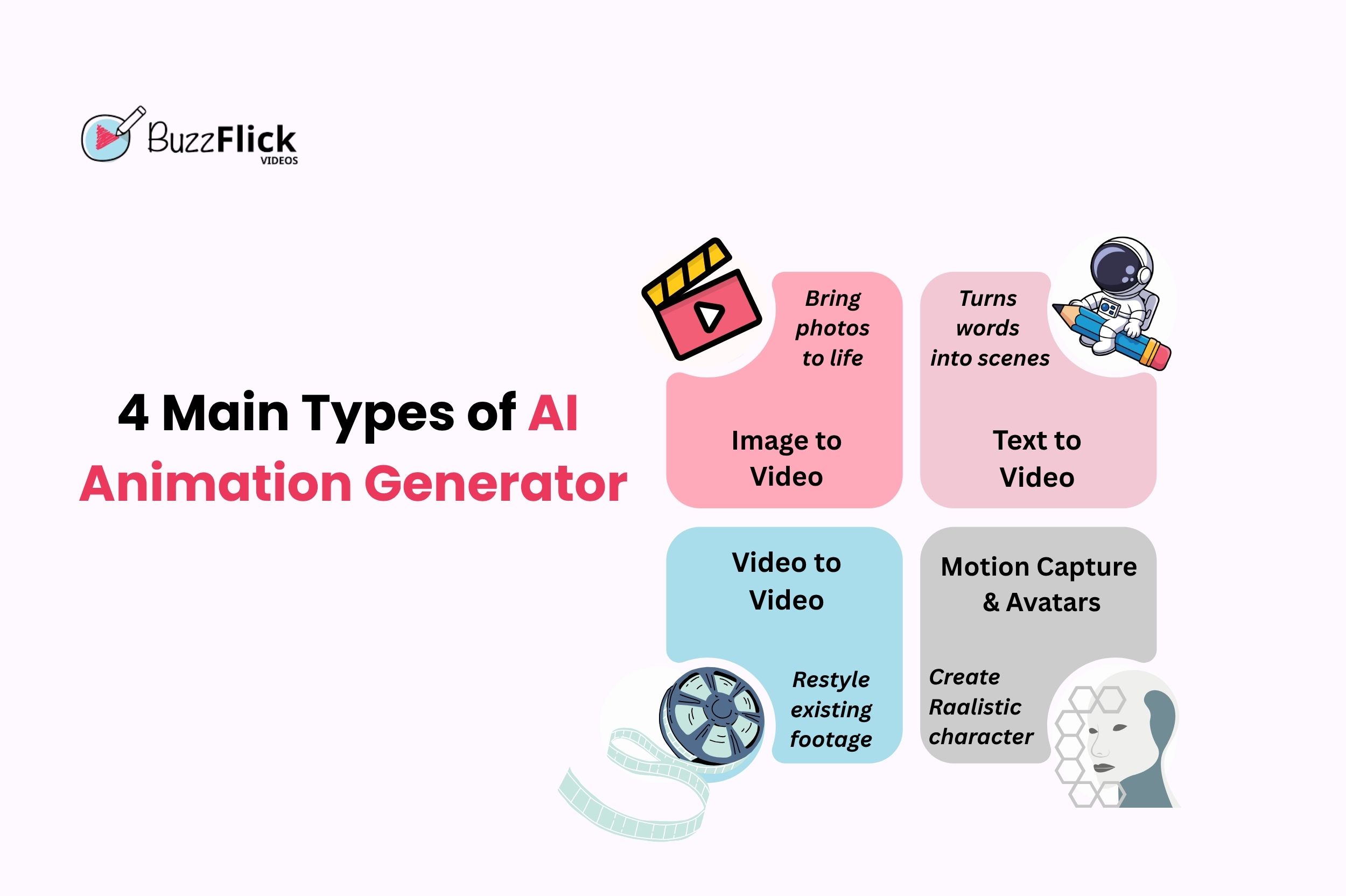
TTV is the foundational model that creates new animated clips from a written prompt. You give AI a written prompt, and it processes it into an entirely new video clip from scratch. It handles scene creation, 3d lighting, and camera movement based only on your words. This is the core functionality of most modern creative AI animation maker tools.
These tools add motion to static pictures, often ones you generated or photographed. Here, AI adds movement, simulating camera motion or making elements inside the picture move. This is an essential feature for creating a short AI animation generator from an image sequence.
VTV AI animation video generators re-style or enhance an existing clip. You upload an existing video and tell the AI to change the entire style to a cartoon look or alter specific elements like background or weather. Many tools use this for things like dubbing or style transfer.
These tools specialize in creating human movement and speech. Instead of generating a full scene, they focus on making digital characters or AI Avatars speak and move realistically based on your script. This is vital for digital explainer or training video production.
Together, these 4 categories cover most needs from social media shorts to training modules and cinematic scenes.
Choosing the right platform depends entirely on your project scope and budget. However, to help you understand the current landscape of the AI animation video generator online market, we summarized our findings in the table below.
It gives you the quickest way to compare the features, model type, and pricing of the best AI animation generators side by side.
| AI Generator | Best For | Model | Price Range | Free Plan? |
| Sora 2 | Cinematic Storytelling & Hyper-Realism | T-T-V, Native Audio, Cameo | $20/month (Pro) | Yes (Invite/Trial) |
| Runway Gen-4 | Cinematic Storytelling & VFX | T-T-V, I-T-V, Video-to-Video | $15 – $95/month | Yes (Credits) |
| Synthesia | Corporate Training & Avatars | AI Avatars, Lip-sync, Dubbing | $29 – Enterprise | Yes (Limited) |
| Google Veo 3 | End-to-End Realistic Video | T-T-V, Native Audio, Realism | $19.99 – Ultra | No (Paid Subscription) |
| Luma Dream Machine | Fast, Realistic 3D Style | I-T-V, Realistic Motion | $9.99 – $79.99/month | No (Paid Required) |
| Animaker | Business Explainer Videos | Drag-and-Drop, Character Builder | $27 for Enterprise | Yes (Watermark) |
| HeyGen | Interactive Talking Avatars | AI Avatars, Script Generation | $29 for Enterprise | Yes (Limited) |
| Krikey.ai | 3D Character Animation | Motion Capture, 3D Avatars | $15 for Teams | Yes (Credits) |
| DeepMotion | Advanced Motion Capture | Motion Capture, 3D Models | $15 – $300/month | Yes (Limited) |
| VideoScribe | Whiteboard Animation | Hand-Drawn Sketch Style | $19 – $35/month | Yes (Trial) |
| Pika Labs | Artistic Experiments/Short Clips | T-T-V, Creative Styles | Free (Beta) | Yes (Free) |
| CapCut | AI-Enhanced Video Editing | Upscaling, Editing, Text-to-Speech | Mostly Free | Yes (Free) |
| Blender (Plugins) | Open-Source 3D Animation | Modeling, Rigging, Simulation | $0 (Open Source) | Yes (Free) |
| Freepik | Budget-Friendly Multi-Model Access | T-T-V, Multi-Model Access | $0 – $14/month | Yes (Basic) |
| PixVerse | High-Quality, Fast Generation | T-T-V, Fast Output | $0 (Daily Credits) | Yes (Free) |
| Hailuo AI | Character Consistency & Reference | T-T-V, Subject Reference | $0 (Daily Credits) | Yes (Free) |
| Renderforest | Versatile Online Video Suite | Templates, T-T-V | $0 – $49/month | Yes (Watermark) |
| Descript | Editing Video via Text | Transcription, Script Editing | $0 (Limited Hrs) | Yes (Limited) |
The following ten AI animation generators listed here represent the highest quality available today. While they require an investment, they offer commercial use rights and superior quality for marketing, training, and creative projects. We recommend these if your primary goal is production efficiency and high-level results.
These tools are built for creators and filmmakers who prioritize visual fidelity and advanced editing controls.
Sora 2 is OpenAI’s state-of-the-art AI animation generator, representing a massive leap in hyper-realistic video creation. The model produces clips up to 20 seconds long with a strong focus on real-world physics and object permanence. A viral feature is the ‘Cameo’ function, which lets you insert your own likeness into any AI-generated scene with remarkable fidelity.
Runway is the gold standard for creative AI animation generator work. Its Gen-4 model generates incredibly detailed and stable video clips from text or images. It excels at text-to-animation AI prompts, providing fine-grained control over camera angles and object motion.
Google Veo focuses on high realism for end-to-end video creation. This platform excels at maintaining scene coherence and generating complex shots. It provides near-perfect lip-sync and integrated native audio.
An excellent AI animation video generator from an image, renowned for its speed and its ability to generate realistic 3d motion from simple inputs. It delivers fast results for professional mockups and rapid prototyping. It’s a go-to choice for realistic AI animation.
These tools focus on communication efficiency, making them perfect for internal training, marketing, and quick product demos.
Synthesia is the leader for corporate training and scalable video content. It specializes in digital presenters, allowing you to create a consistent digital presenter who speaks your script in over 140 languages. It is the definitive AI avatar video generator.
HeyGen competes directly with Synthesia, offering highly interactive and customizable avatars. It is excellent for quick marketing videos and digital communication. Its key strength is producing high-quality content based on a script, focusing on strong lip-sync and clear presentation.
Animaker specializes in easy-to-use 2D animated character videos and simple marketing clips. It features an extensive drag-and-drop builder and a large asset library. It’s perfect for users who need colorful, engaging types of explainer videos without any prior animation experience.
These platforms cater to niche markets, focusing on specific artistic methods or advanced 3D control.
VideoScribe is the leading tool for creating whiteboard animation. It generates videos where a hand appears to draw or sketch content on a whiteboard in real time. It is highly effective for educational content and conceptual explanations.
Krikey.ai focuses on 3D character animation. You can generate custom 3D avatars and then use text prompts to make them perform complex actions. It’s an excellent bridge between simple text to animation AI and professional 3D work.
For users focused on advanced motion capture, DeepMotion is a great choice. It lets you upload a standard video of a person acting, and the AI translates that movement into a clean 3D motion file. It’s a specialized tool for developers and 3D artists.
If you are new to the field, start with AI animation generator free of cost options like Pika Labs or PixVerse. While free tiers often come with watermarks or credit limits, they are perfect for learning and experimentation.
Here are the free AI animation generators that offer the most valuable access to animation AI features without requiring payment.
These free AI animation video generators offer the best quality output for their zero-cost plans.
Pika is one of the most popular free platforms accessible through Discord. It offers a generous credit system that allows users to experiment with various styles and short video clips using text-to-animation AI free prompts.
Blender is the industry standard for free, open-source 3D software used by professionals globally. While the software is completely free, users can leverage various third-party animation AI plugins for advanced features like automated rigging and scene processing.
PixVerse provides a very generous daily credit system for AI animation video generator free access. Its model produces detailed video clips that rival many paid services, often focusing on high resolution and fast output. It is a fantastic place to start if quality is your main priority.
The following are the free AI animation generators that offer professional-grade services with limited free access to get you hooked.
CapCut is the most-used free video editor that has integrated several AI features into its platform. You can use its AI-enhanced video editing tools for upscaling, stabilization, and generating text-to-speech voiceovers for free.
Hailuo is known for offering free access with character consistency in your animations. Its free daily credits are excellent for users who need to produce short, multi-clip narratives without their main subject changing appearance.
Renderforest offers a comprehensive AI animation video generator online suite built around templates. Its free plan gives you access to a huge library of assets and basic text-to-video tools which is excellent for testing different video formats.
Descript is unique because it lets you edit video by simply editing the transcribed text, making it a powerful tool for script-based content. Its free tier offers limited hours of transcription, which is perfect for creating simple, text-edited videos.
Freepik is a major design asset library that has integrated various video AI tools into its platform, including a text-to-video model. Its free tier provides access to basic video creation tools and a vast library of design assets.
Free AI animation generator tools are best for learning and light use. They often provide daily credits or a watermarked export. You can test how animation AI works without spending money.
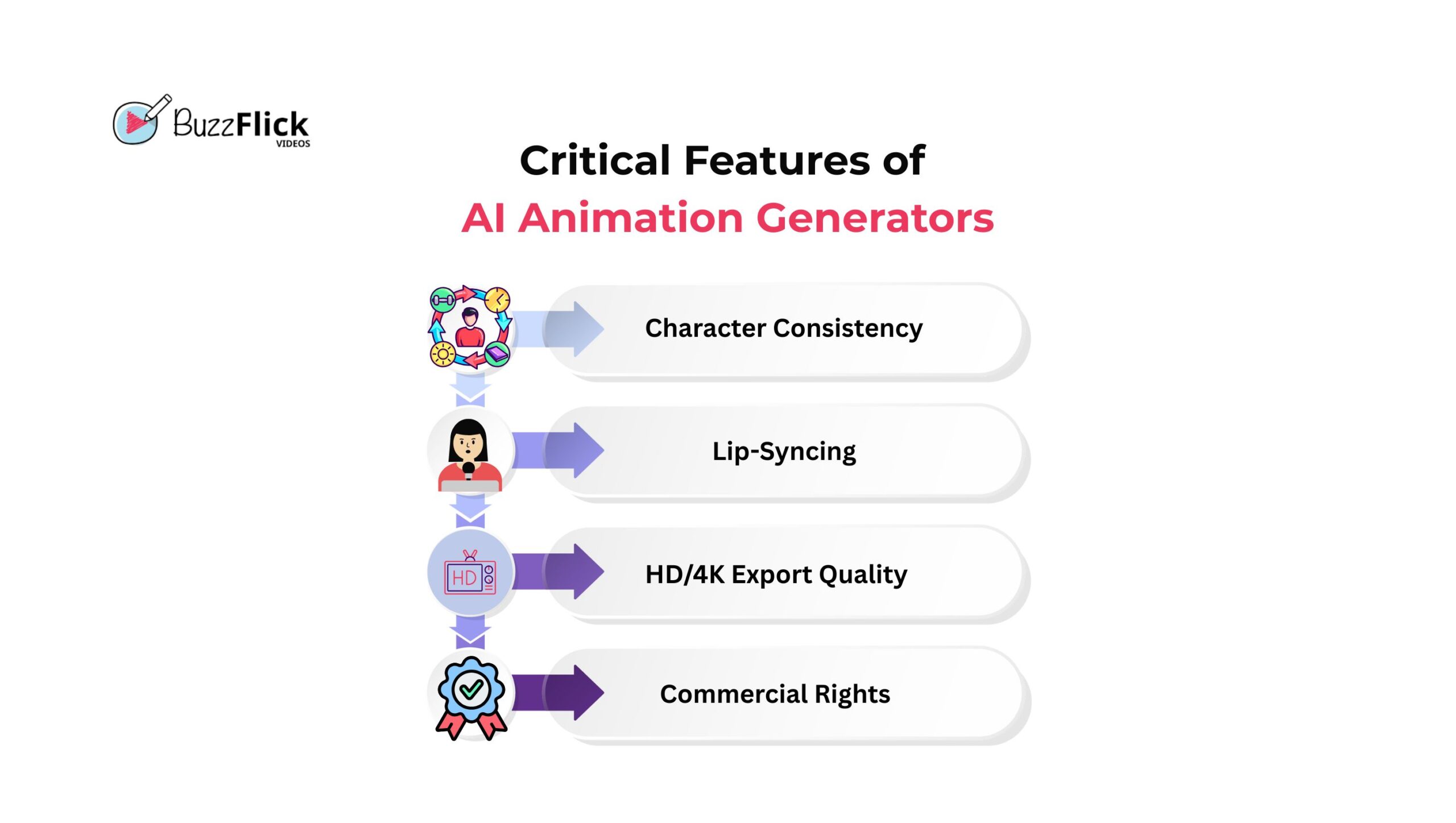
Paid tools focus on business and professional content. They support HD and 4K exports, commercial rights, and larger projects. Teams that need corporate training or branded campaigns get more value from subscriptions.
Here is a quick look at the differences.
| Criteria | Free AI Animation Generator | Paid AI Animation Generator |
| Price | $0 | $10–$300 per month |
| Quality | Standard or HD | HD and 4K |
| Watermark | Usually included | None |
| Rights | Limited | Commercial use |
| Best For | Testing, learning, social posts | Marketing, training, film, enterprise |
If you only need simple clips for personal use, an AI animation generator from text free options is enough. However, for professional results, paid plans offer the quality and rights you need.
When evaluating a paid platform, you must look for the following specific features and controls that ensure quality and consistency.
The process to make videos using an AI animation video generator is remarkably simple compared to traditional animation. You don’t need a deep technical background. Just a creative idea and a good understanding of how to describe it can get you through.
This is the standard approach for creating a video clip via an AI animation generator from text from scratch.
If you want to add motion in a static image, you can use photo animation AI tools as described below:
The best AI animation maker is simply the one that solves your problem most efficiently. Paid tools make sense if you need polished videos for business or training. However, recommended free platforms are fine if you just want to test ideas or play around with animation styles.
If you are new, start simple with a free AI animation generator from text and learn how prompts shape results. Once you are comfortable, move to a paid plan for longer clips and better output.
At Buzzflick animation studio, we already combine traditional creativity with AI animation video generators to deliver content faster without losing quality. Our team works with businesses and creators every day to produce animation that feels professional and engaging.
Yes. AI animation video generator tools can create full-length animated videos from simple text prompts or images. These tools automate motion, lip-sync, and rendering. The results depend on the quality settings and editing features offered.
Many AI animation generator free tools offer a free tier. However, these usually include watermarks, credit limits, or low-resolution output. Fully featured, professional tools generally require a paid subscription for commercial use of AI animation.
Clip length depends on the platform. Most direct text-to-animation AI generators are limited to short clips, usually 4 to 16 seconds. Tools specialized for AI Avatars and business use, like Synthesia, can produce continuous videos up to four hours.

Chromebooks have grown from just for typing essays and watching skits to letting everyone test their creativity in their desired ways. Yes, those days are...
Read More
Get A Custom Quote Now


Copyright © Buzzflick 2026, All Rights Reserved.
Get Video Animation at Reasonable Prices at BuzzFlick! Get A Quote!